

I review tech for a living, so asking AI for the “best website for tech reviews” came with a small risk of bruised pride. Would TechRadar get a mention, or would the answer send readers straight to the competition? That was one of the questions I put to HubSpot AEO.
HubSpot’s answer engine optimization tool tracks selected questions across ChatGPT, Gemini and Perplexity. It shows which brands appear, which pages the answers cite, and suggests content work based on those findings. What interested me was being able to read the answers behind the score, then check the sources for myself.
I used the free trial to set up TechRadar and track 11 of the 25 available prompts. My hands-on review covers setup and reporting, with product demonstrations and documentation filling in the workflows I didn’t try. One day of results can’t prove long-term gains, but it gave me enough to judge whether the tool helps make sense of AI search or simply adds another chart to the working day.
HubSpot AEO: Plans and pricing
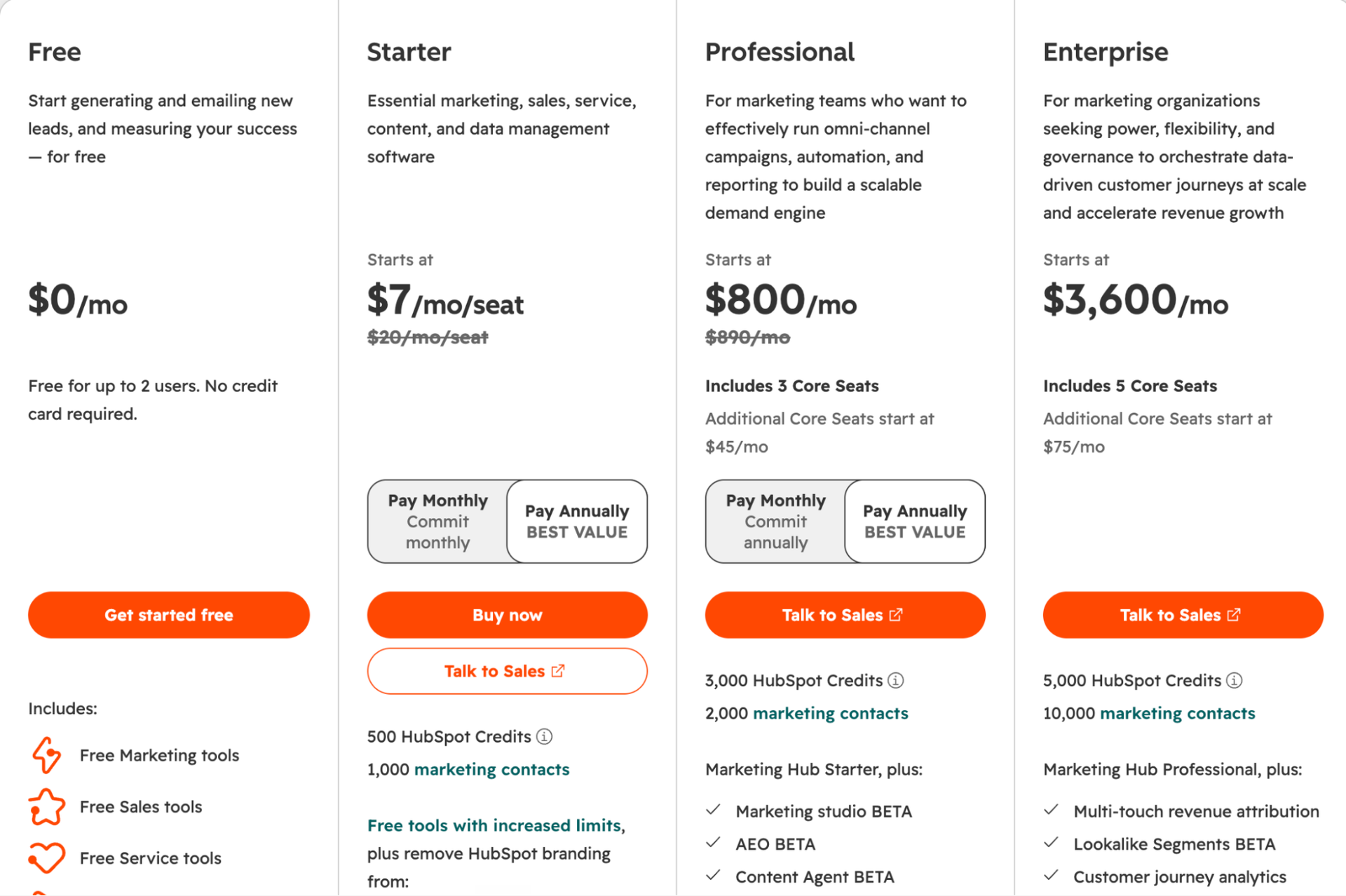
The standalone price for using HubSpot’s AEO tool is $50 a month, or $45 a month billed annually, which comes to $540 a year before tax. You also get a 28-day free trial that requires no credit card; there’s no need to buy another paid HubSpot product first.
|
Access |
Starting price (USD) |
Tracked prompts |
Monthly answers |
|
AEO trial |
Free for 28 days |
25 |
2,500 |
|
Standalone AEO |
$50 monthly or $540 yearly |
25 |
2,500 |
|
Marketing Hub Professional |
$800/month, paid annually |
25 |
2,500 |
|
Marketing Hub Enterprise |
$3,600/month |
50 |
5,000 |
|
HubSpot for Marketers Professional |
$900/month, paid annually |
25 |
2,500 |
|
HubSpot for Marketers Enterprise |
From $3,800/month |
50 |
5,000 |
The AEO features are also included in Marketing Hub Professional and Enterprise plans. And, the HubSpot for Marketers option bundles Marketing Hub with Content Hub and include AEO too. Those prices cover the wider software package, and not an AEO surcharge.
Now, if you’re just on the AEO plan and want more credits, it costs $20 a month for another 10 prompts and 1,000 monthly answers. A standalone account tracking 45 prompts therefore costs $90 a month on monthly billing. Not to forget, tracking another brand requires a separate AEO instance.
Content generation has a separate cost too. Generating a piece from an AEO recommendation requires Marketing Hub Professional or Enterprise and uses 1,000 HubSpot Credits. Standard Professional plans include 3,000 monthly credits, while Enterprise includes 5,000. Extra credits cost $10 per 1,000, and unused monthly credits expire. CRM-based prompt suggestions also require Marketing Hub Professional or Enterprise.
There’s one pricing wrinkle, though. Accounts enrolled in HubSpot’s flexible seats-and-credits program have separate terms, including two credits per AEO answer. That is a different model from the standard prompt allowances above. So, do check which model your account uses before budgeting.
HubSpot AEO: Setup
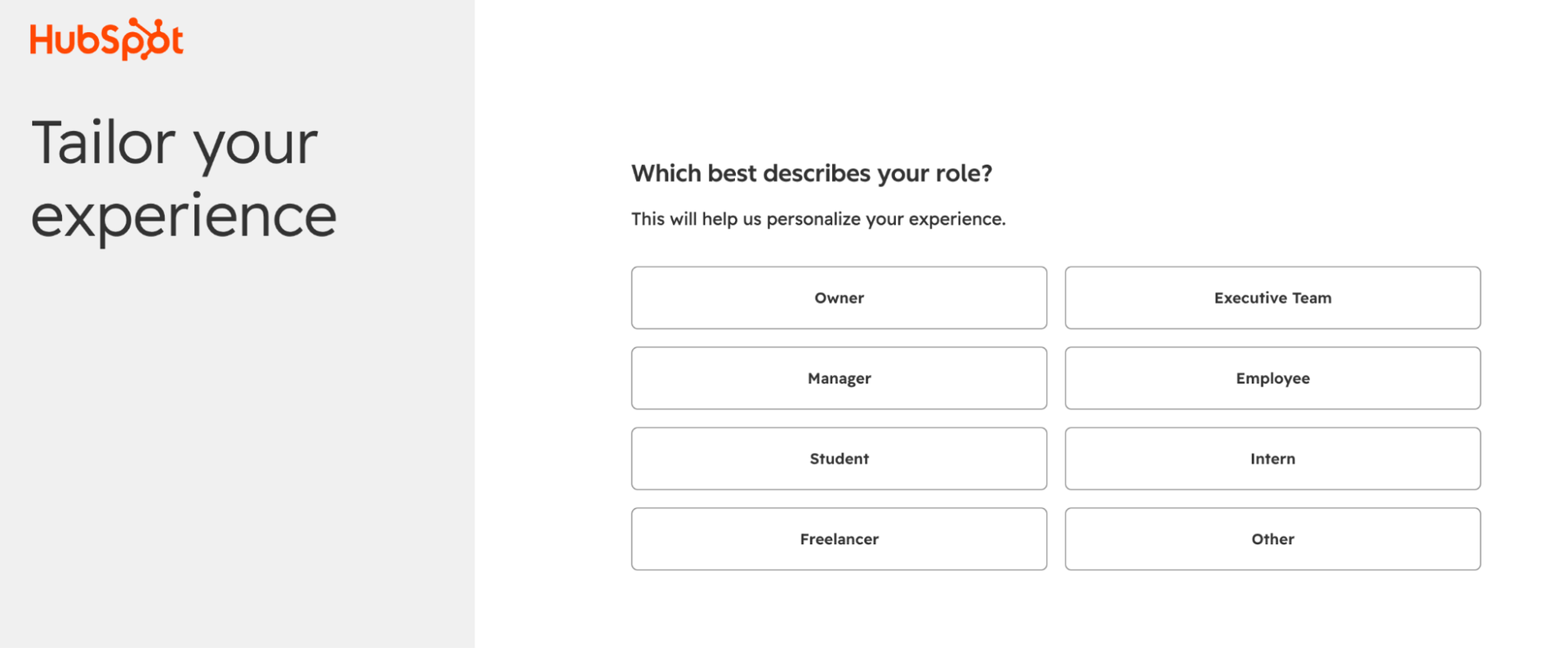
I signed up with my email and answered a question about my role. From there, HubSpot took me through the AEO setup one step at a time.
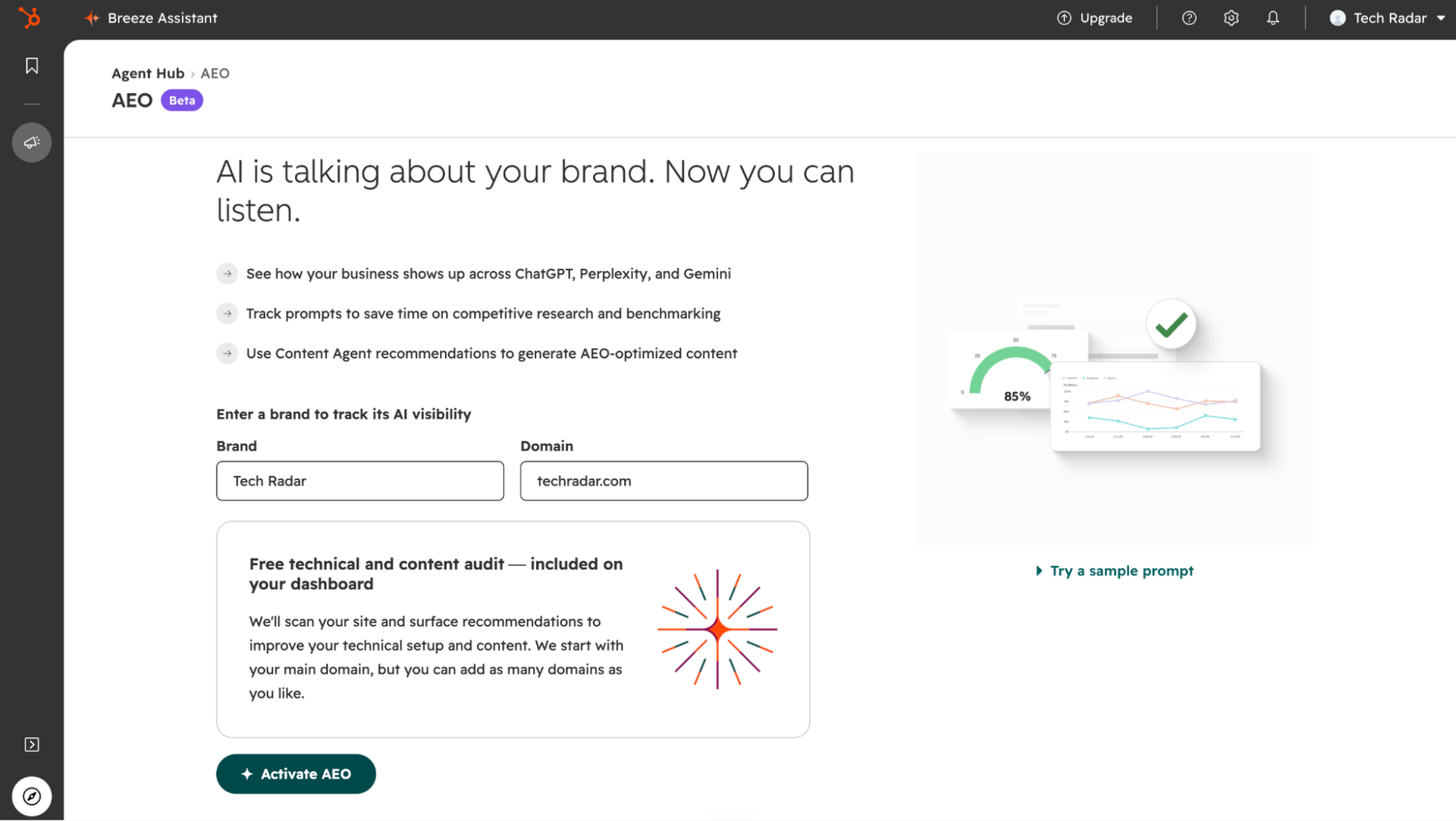
Next, I entered TechRadar’s name and website address. That led to the competitor and audience settings, where I could narrow down what I wanted to track.
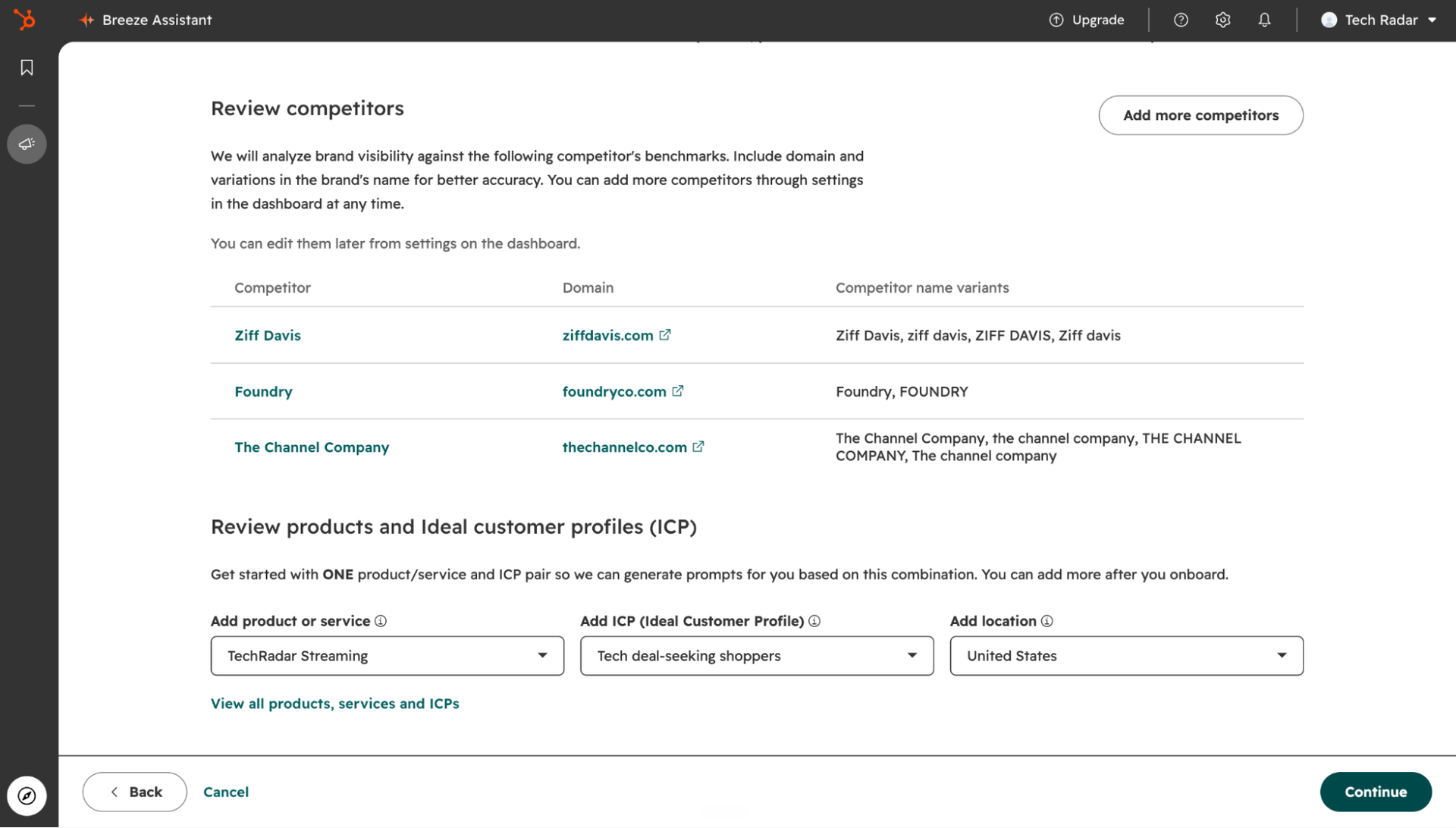
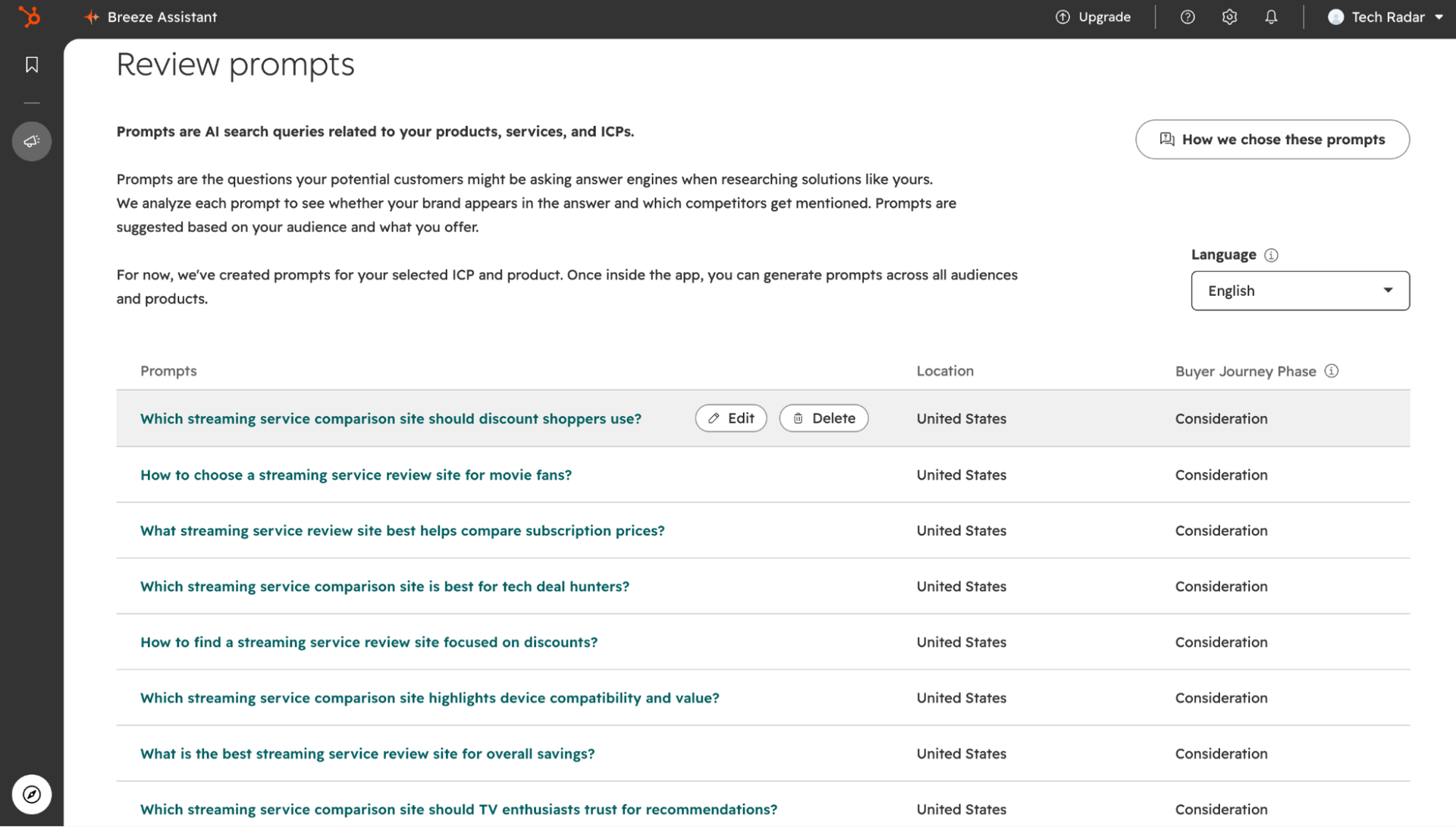
I reviewed the suggested competitors and chose TechRadar Streaming, focusing on deal-seeking shoppers in the United States. I wasn’t convinced by every competitor suggestion, though. Some were publishing companies rather than the review sites readers might compare.
HubSpot used those choices to suggest questions to track. I could edit or remove prompts before continuing. Several asked much the same thing, so I found the suggestions useful for getting started, but too narrow to cover different reader needs on their own.
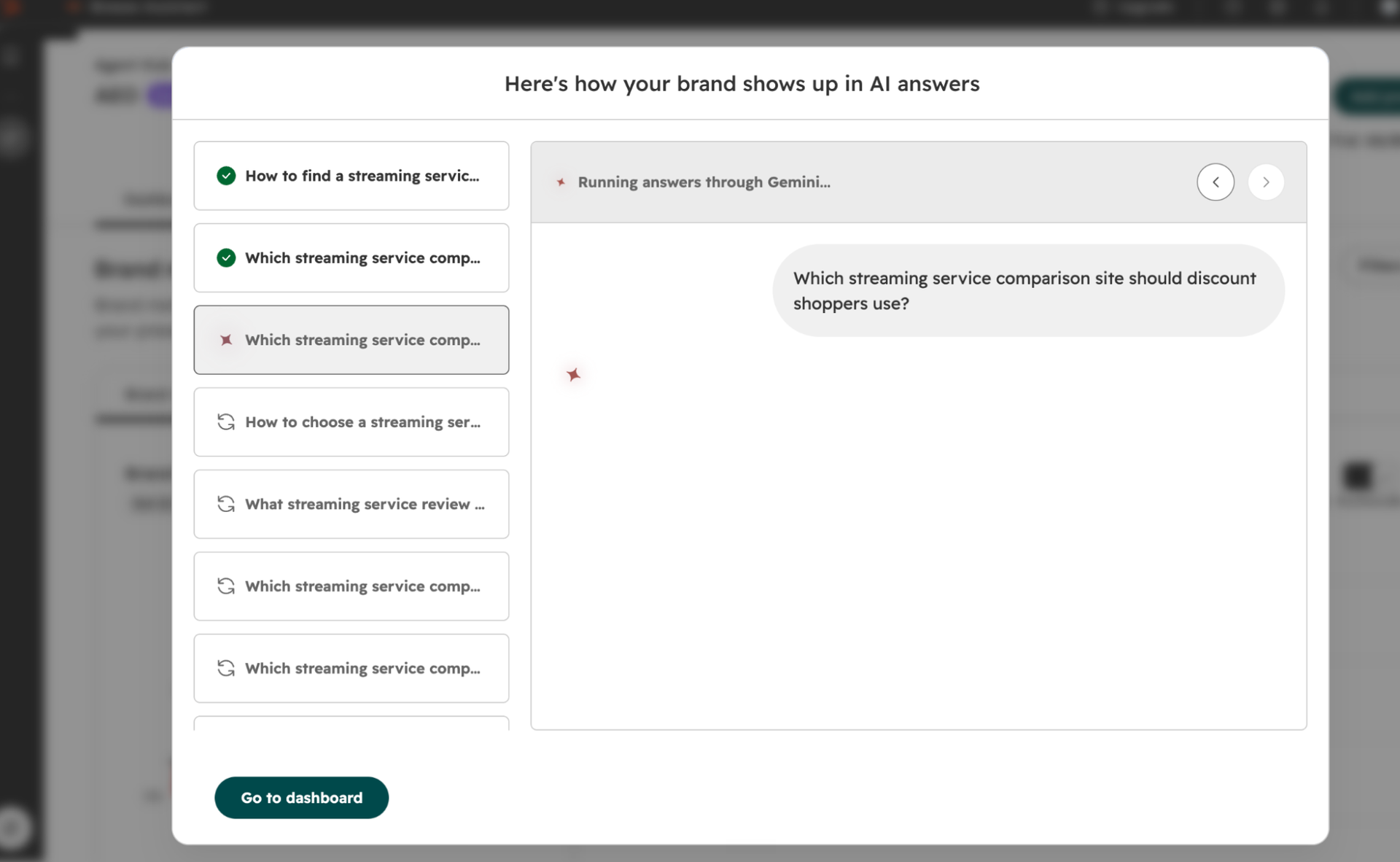
I then started the checks and followed HubSpot’s progress as it worked through the prompts. From there, I could open the dashboard and start exploring the answers, brand mentions and cited sources.
HubSpot AEO: Features and specs
Prompt tracking
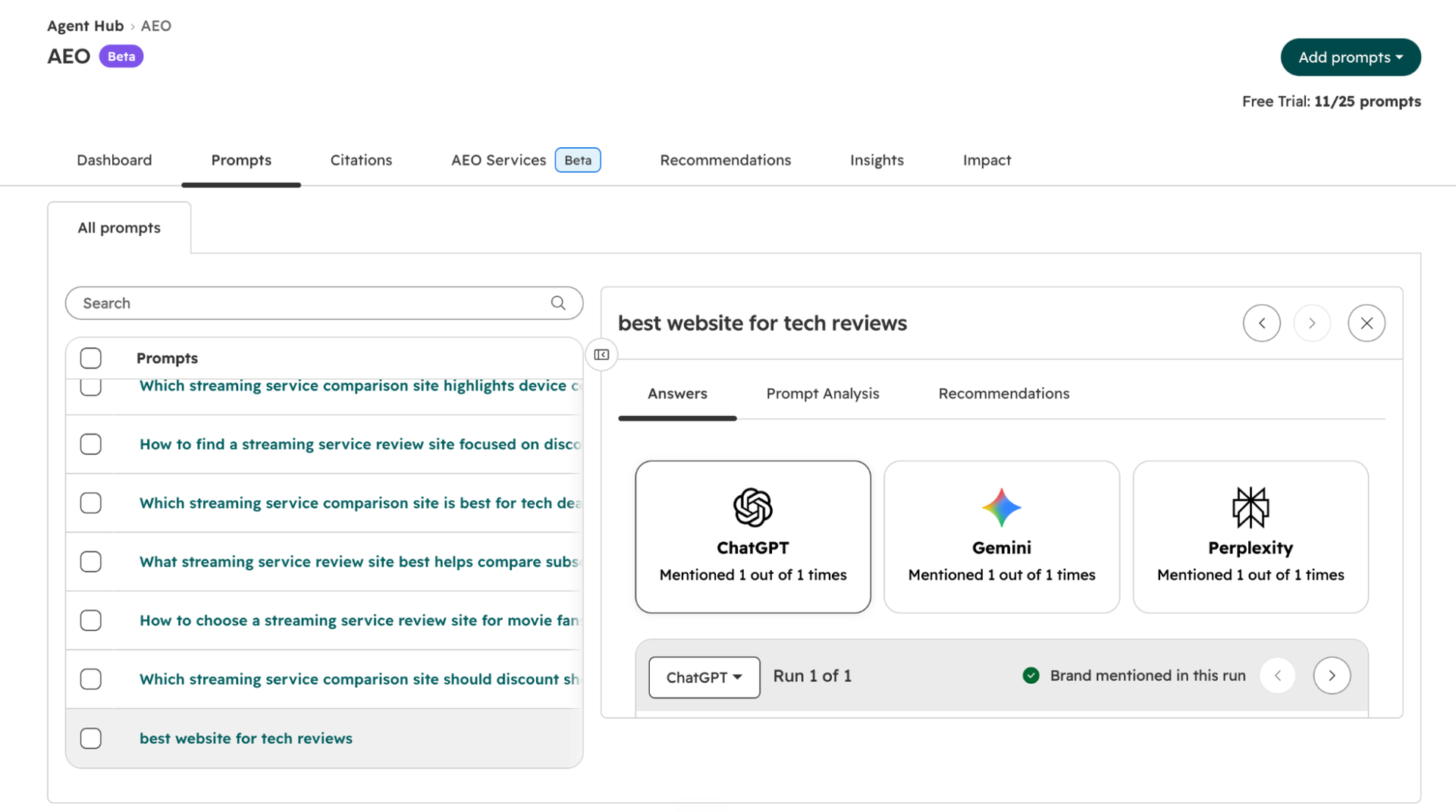
The panel also separates Answers, Prompt Analysis and Recommendations. I like that structure because a weak score has somewhere to lead like you can inspect the answer, compare the sources, then consider a change. These are repeatable checks of chosen questions, not a log of what every buyer asks.
Brand visibility and competitor analysis
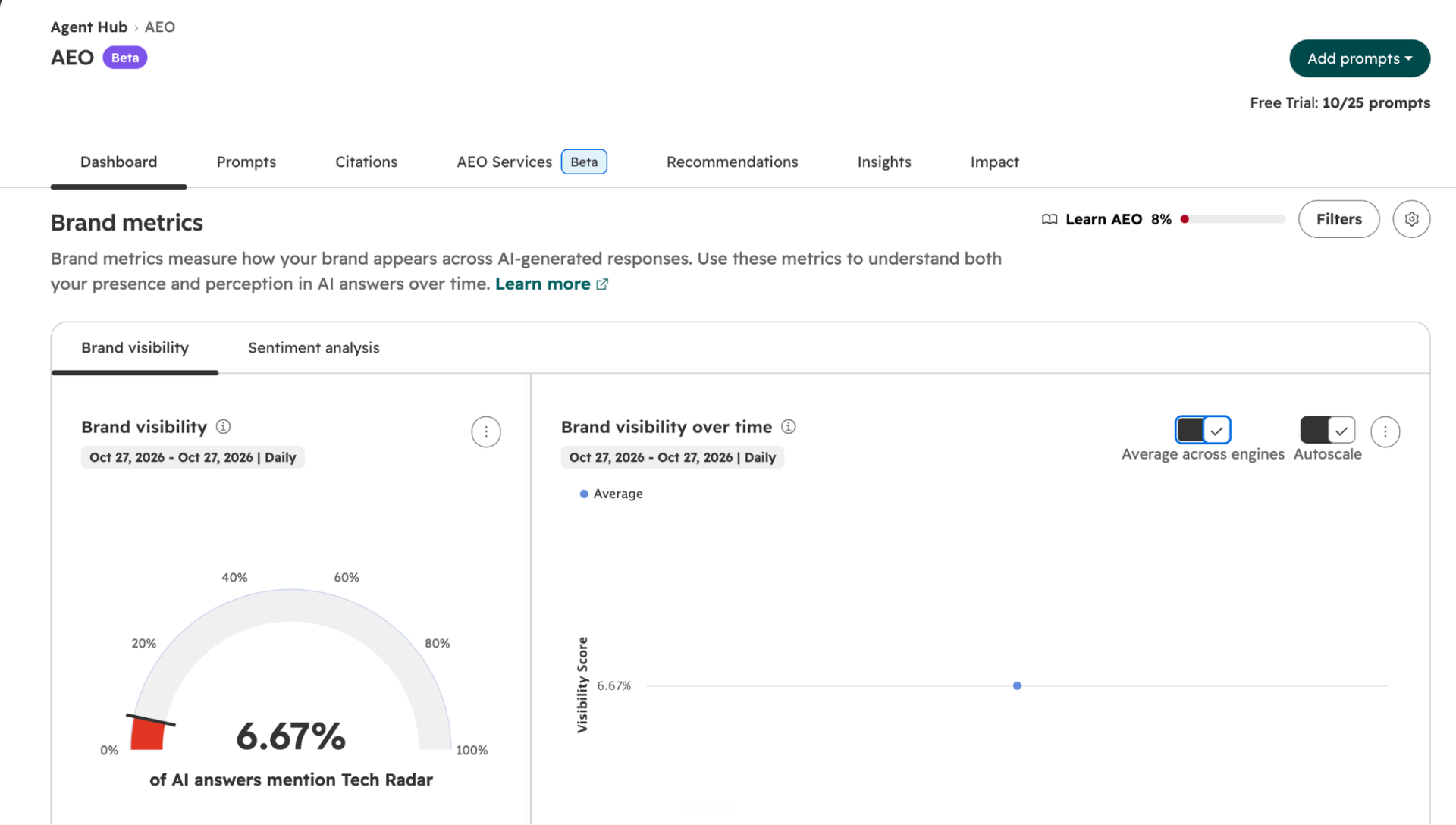
The earlier dashboard screenshot showed 6.67% brand visibility while the account held 10 prompts. Its date range ran from October 27 to October 27, with a single point on the trend chart. That was a baseline, not enough history to judge progress.
The broader review-site question above comes from the later 11-prompt view. Comparing that single question with the earlier average would be misleading. The contrast shows how much the choice of questions matters, not that visibility suddenly improved.
Visibility measures how often the brand appears in the tracked answers. Share of voice compares its mentions with the selected competitors. Filters for engine, product, audience and buying stage help explain where a gap sits. And, Sentiment adds context about how the brand is described, rather than just whether it appears.
For TechRadar, I also need to separate being named as a recommended review site from having a guide cited in an answer. Both can be useful, but a mention score alone doesn’t capture that difference.
Citation analysis
This is the report I find most useful for planning content. A mention tells me the brand appeared. Citation analysis shows the pages and domains used as sources, including sources owned by other businesses.
My Citations screen splits the results by content type and channel. The first view concerns formats, such as blogs, comparisons, and documentation. The second concerns where the material comes from, with categories including owned, earned, peer, review-site, and user-generated sources.
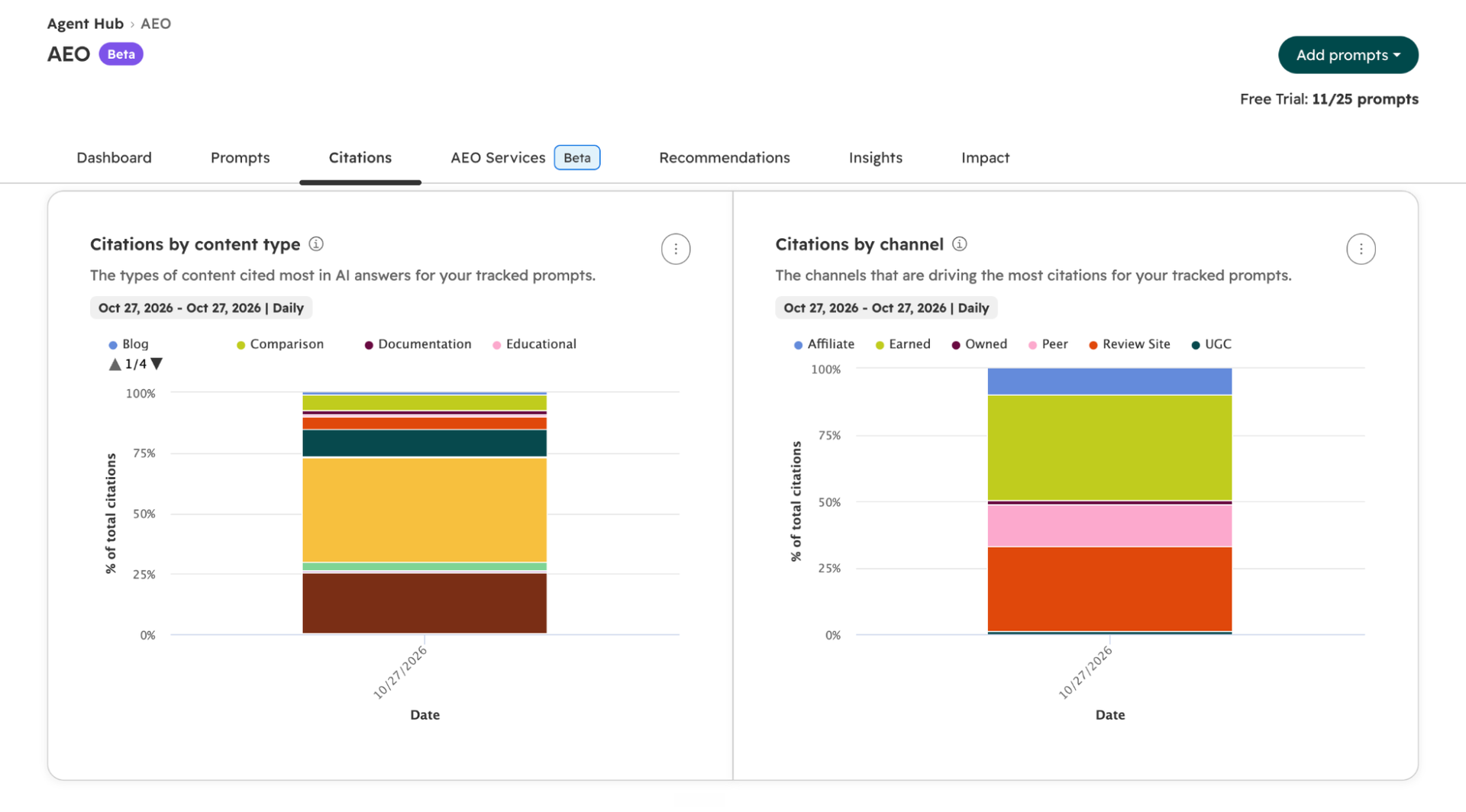
Earned and review-site sources occupied large parts of my channel chart, while owned content had a thin slice. I read that as a reason to inspect outside sources before assuming another page on our own site is the answer. These are sources across the tracked prompts, though. They don’t all necessarily mention TechRadar.
The wider report lets you inspect top domains and individual URLs, and compare owned-domain citations with citations whose source pages mention your brand. That helps distinguish if you should improve your own pages or earn coverage elsewhere. Neither count proves that someone clicked through or bought anything.
Content recommendations
HubSpot uses the prompts and cited sources to suggest workarounds for owned content, social amplification, and outreach. Each recommendation has a content type, channel, and priority. Opening it adds a suggested title, summary, audience, and keywords, with the prompts and citations behind the idea.
Suppose a tracked question keeps citing third-party comparisons. Here, updating a relevant comparison page or seeking inclusion in one could be more useful than publishing another broad guide. This is exactly where the source list helps make that choice.
The recommendation can then be marked complete. I see this as a useful brief for a writer or outreach lead, rather than a finished strategy. Someone still needs to check the cited pages, decide whether the suggestion fits the business, and do the work.
Content generation and impact tracking
For eligible Marketing Hub accounts, the Generate asset feature takes an owned-content or social recommendation into Content Agent. It uses the brief alongside brand voice, audience information, and cited pages. The draft appears in the recommendation’s Content tab, ready to open in the relevant editor.
I like the direct handoff because the source research and writing brief stay connected. It still needs an editor. That’s because a draft can follow a useful outline and still remain thin on facts, examples, or a reason to choose that business.
After publication, the Impact tab accepts the page URL and tracks whether it earns citations for the target prompts. This gives the recommendation a follow-up check instead of ending at “published”. It doesn’t prove that the tool caused an increase, and it isn’t sales attribution.
Is HubSpot AEO worth it?
I recommend starting with the trial for one clear product, audience, and set of questions. My setup exposed the main risk early: a tidy dashboard can still rest on repetitive prompts and a questionable competitor list. Fix those inputs before spending time on the score.
For a small team, the standalone plan is a reasonable way to replace repeated manual checks and find useful source pages. Existing Marketing Hub Professional and Enterprise users get more value from the connected content tools. That’s why I don’t see a case for buying the wider suite solely for AEO.
The buying decision comes down to what the reports change. Find a worthwhile page to improve, a source to approach, or a buyer question you’ve missed. Without that next step, more daily data won’t earn its monthly fee.
FAQs
What is HubSpot AEO tool?
HubSpot AEO is an answer engine optimization tool that tracks how your brand appears in answers from different AI tools. It monitors selected questions, compares brand mentions with competitors, and shows which pages get cited. It also suggests content updates and outreach opportunities based on those findings.
Is HubSpot AEO free?
No, HubSpot AEO is not free, but it offers a 28-day free trial with 25 tracked prompts and no credit card required. Standalone access then costs $50 a month, or $45 a month billed annually. AEO is also included with paid Marketing Hub Professional and Enterprise plans. HubSpot’s free AI Search Grader is a separate snapshot tool.
Is AEO different from SEO?
Yes, AEO differs from SEO in its main goal, though the two overlap. SEO focuses on visibility in search results, whereas AEO focuses on getting your brand mentioned or your content cited in AI-generated answers. Both depend on helpful content and pages that search engines can access. I see AEO as an extension of SEO, not a reason to abandon it.
How to do AEO optimization?
AEO optimization starts with checking how your brand appears in answers to questions your customers ask. I recommend reviewing the brands and sources cited, then improving pages that leave those questions unanswered. Make your content accessible to crawlers and seek relevant coverage on trusted websites. Track the same questions over time to see whether mentions and citations change.
How to write content for AEO?
To write content for AEO, answer a specific question first, then add evidence, examples, and context. I keep each section focused on one topic, with clear headings and tables or lists where they help. Each passage should make sense on its own. Original research, expert insights, and useful FAQs give the page more substance than a rewrite of existing advice.




Commenti recenti